RichText
Introduction
Pamela.Text works well with mono-styled text. It offers inline editing controls and simple styling. But what if i want to work with multiple styled text? Pamela.RichText is here for this. It allows you to render markdown or html documents in a fully customizable shape. Just provide it the source content, give it some boundaries and… Here your complex document appears!
Main functionalities
These are main functionalities for Pamela.RichText:
Markdown document rendering
Html document rendering
Simple text rendering
Font configuration capability
Background color
Text coloring
Text alignment
Padding
Resizing controls
Rendering some Markdown on the Stage
Funny. How can i render a markdown document on this shape? The document is the following:
# This is my sample document
## Now i have a subtitile
Let's put **some** bold text, now *italic*.  Break
Break line
> Now a blockquoteAs you can se its a fully featured markdown document, we have titles, subtitles, simple text, effects and so on.
Now lets add the shape to a stage called stage:
stage.add(new Pamela.RichText({
      draggable: true,
      // This is the content of the document
      markdownContent: '# This is my sample document\n' +
                       '## Now i have a subtitile\n' +
                       'Let\'s put **some** bold text, now *italic*.  Break  \n' +
                       'Break line\n' +
                       '> Now a blockquote',
      // Give it some size
      width: 500,
      height: 500,
      fontSize: 20,
      // Specify that we are using Markdown
      sourceType: RichTextSource.Markdown,
}));The rendered result will be:

Very simple, isn’t it?
Rendering html on the Stage
Pamela.RichText also supports direct html text rendering. Let’s see an example.
The document i wanna render is this:
<h1>My document title</h1>
<h2>Document subtitle</h2>
Simple text
<b>Bold</b> text. Now it's <i>italic</i>Let’s add it to the shape:
stage.add(new Pamela.RichText({
      draggable: true,
      name: 'rich',
      htmlContent: '<h1>My document title</h1>\n' +
                   '<h2>Document subtitle</h2>\n' +
                   'Simple text\n' +
                   '<b>Bold</b> text. Now it\'s <i>italic</i>\n',
      width: 500,
      height: 500,
      fontSize: 20,
      // Important!!! It indicates that we are using pure html
      sourceType: RichTextSource.Html,
}));Rendered result will be:
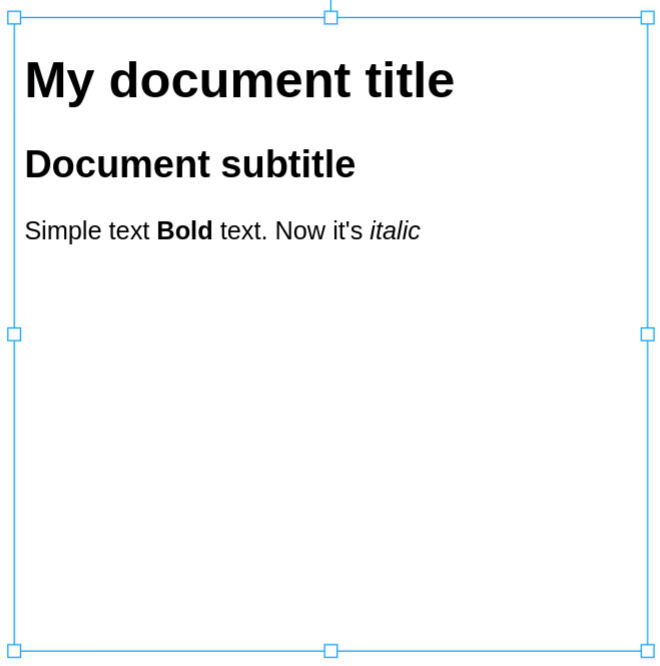
Configuring the font
To configure the output font, especially when rendering markdown, we can use:
stage.add( new Pamela.RichText({
  ...other richtext configurations
  fontSize: 20,
  fontFamily: 'Courier New',
  fontDecoration: '...',
  fontVariant: '...'
}));Adding colors
Lets re-use the first RichText, the one rendering markdown document, and lets add some colors to it:
stage.add(new Pamela.RichText({
      draggable: true,
      // This is the content of the document
      markdownContent: '# This is my sample document\n' +
                       '## Now i have a subtitile\n' +
                       'Let\'s put **some** bold text, now *italic*.  Break  \n' +
                       'Break line\n' +
                       '> Now a blockquote',
      // Give it some size
      width: 500,
      height: 500,
      fontSize: 20,
      // Specify that we are using Markdown
      sourceType: RichTextSource.Markdown,
      fill: 'black',
      backgroundColor: 'black',
      textColor: 'orange',
}));Rendered result:
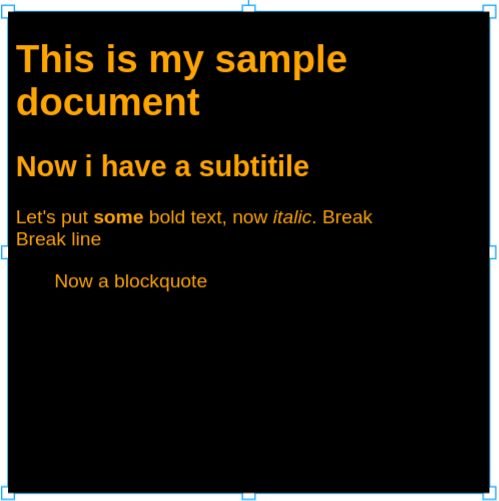
Using this additional configuration properties, we have set the background color to black and the text color to orange.
Configuration properties
All properties useful for configuring a RichText.
Property | Type | Description |
|---|---|---|
|
| Source markdown document to render |
|
| Source html document to render or the parsed markdown |
|
| Indicates if the source of this shape is html or markdown. When set to markdown, source will be read from |
|
| Document padding |
|
| Base text color |
|
| Document background color |
|
| Font size |
|
| Font family |
|
| Font decoration |
|
| Font style |
|
| Font variant |
|
| Horizontal text alignment |
Useful methods
All useful methods for RichText:
Method | Parameters | Description |
|---|---|---|
|
| Calculates a new font size to make text fit into its container boundaries. This is a complex operation, so it is asyncronus. Returns the new font size. If fontsize becomes <= 6pt, shape is also resized to make all fit. |